B2B Payment Methods with Stripe Connect
Sply24 lets wholesale sellers accept online payments for B2B orders through their connected Stripe account. The platform supports three online B2B payment options: Stripe ACH, Stripe SEPA, and Stripe Card.
Stripe ACH
ACH Direct Debit for U.S. buyers paying wholesale orders from a U.S. bank account. Sply24 supports USD orders and applies default warning limits from $1.00 to $10,000.00.
Stripe SEPA
SEPA Direct Debit for European buyers paying in euros from a supported bank account. Sply24 applies default warning limits from €1.00 to €10,000.00.
Stripe Card
Credit and debit card payments for buyers who want to pay at checkout. Card payments can work with the company currency supported by Stripe.
Sply24 does not add a platform commission to these transactions and does not route buyer funds through a Sply24 bank account. In the Sply24 payment flow, the buyer pays the seller through the seller's connected Stripe account. Standard Stripe processing fees and account rules can still apply.
What Is Stripe Connect?
Stripe Connect links a seller's Stripe account to Sply24. Stripe hosts the onboarding flow, collects the business and identity information required for the account, checks outstanding verification requirements, and manages the seller's payout details inside Stripe.
This setup helps protect the business owner because sensitive verification and payout information is handled by Stripe rather than entered into Sply24. Sply24 receives the connection status needed to enable online payment methods, but it does not need to store the seller's Stripe password or bank login.
Stripe onboarding
Stripe collects and verifies the business, representative, ownership, identity, and payout information required for the connected account.
Direct connection
The seller connects an existing Stripe account or creates one during the Stripe-hosted onboarding process.
Account readiness
Sply24 checks the Stripe connection state and whether the connected account is ready to accept charges.
Prepare Your Stripe Account Before Connecting
Before starting the Stripe Connect process in Sply24, sign in to your Stripe Dashboard and complete the main account setup steps required by Stripe. Make sure your business information is up to date, all requested verification checks are completed, and your account is ready to accept payments and receive payouts.
Stripe requirements may vary depending on your country, business type, payment methods, and current verification rules. Follow the instructions shown in your Stripe Dashboard and resolve any outstanding requirements before connecting the account to Sply24.
Connect Stripe to Sply24
Open Payment Methods in the Sply24 seller dashboard and select the Stripe Connection Status tab.
Review the current connection state and click Connect.
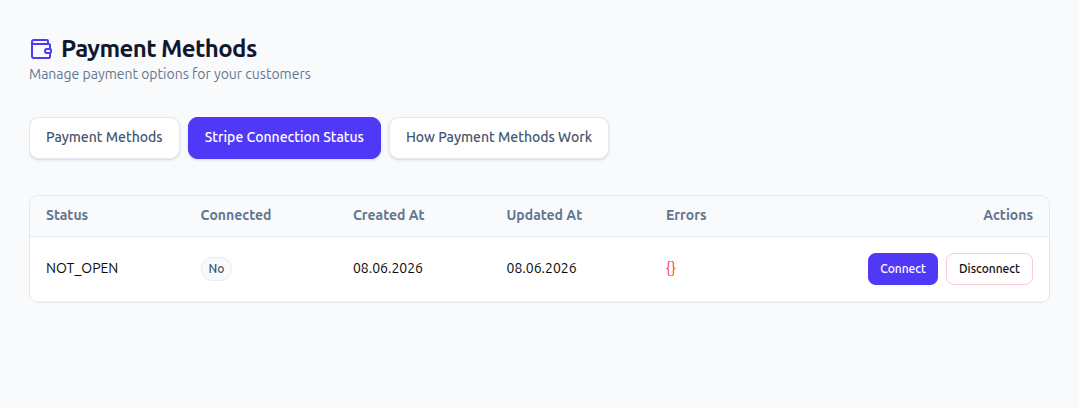
Sply24 sends the company email to Stripe to help identify the account. When the company email is not available, Sply24 uses the user email.
In Stripe, you can select an existing business account or create a new Stripe account during the connection process.
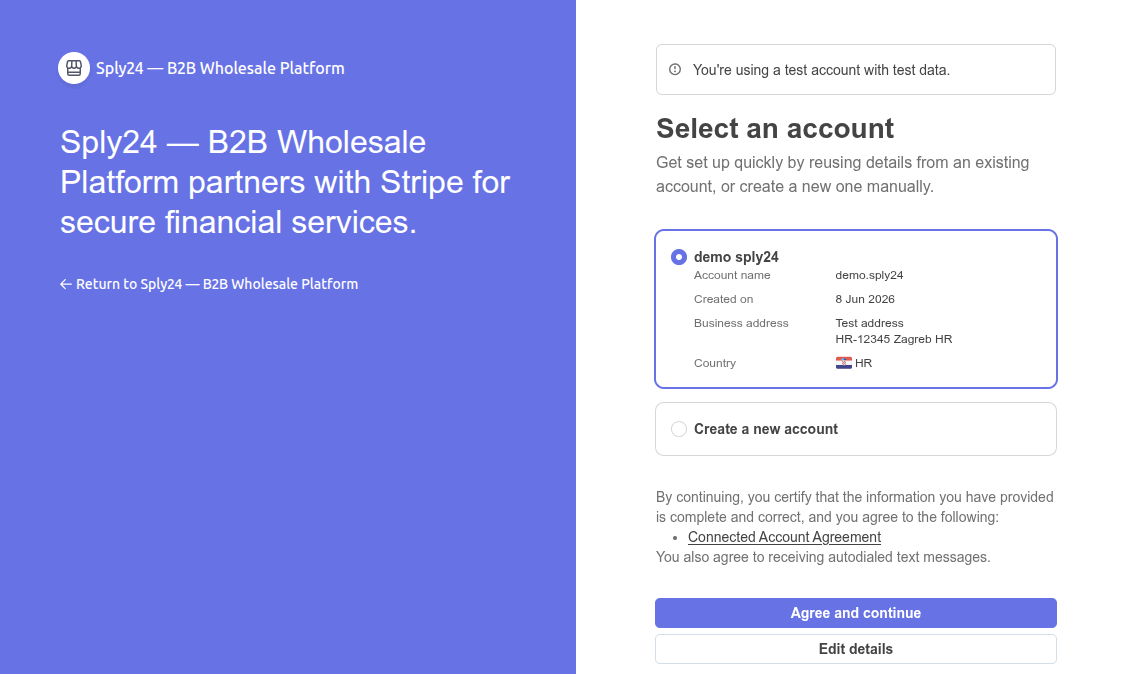
Complete the Stripe-hosted onboarding flow. After Stripe returns you to Sply24, open Stripe Connection Status again and verify that the account is connected.
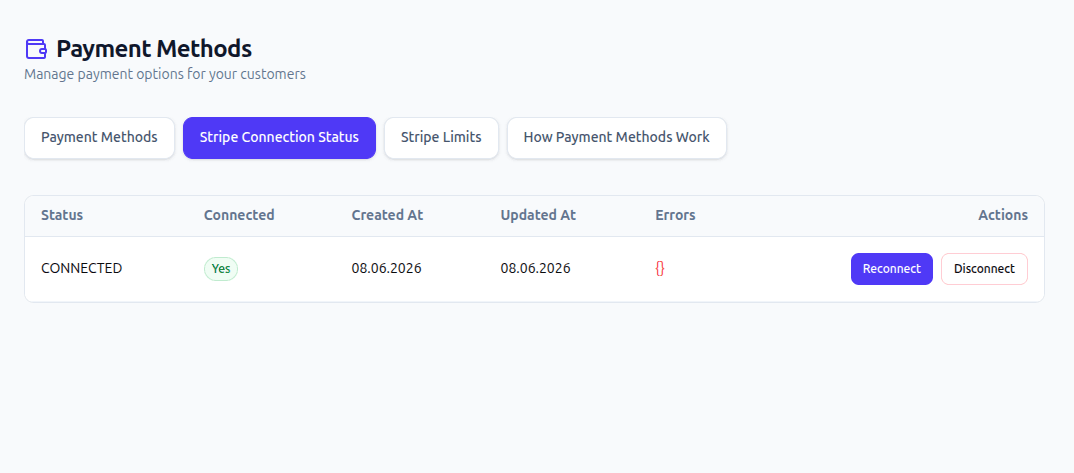
Stripe Connection Statuses
| Status | Meaning | What to do |
|---|---|---|
| NOT_OPEN | No Stripe connection attempt has been started. | Click Connect to begin Stripe onboarding. |
| PENDING | The connection request was submitted and Sply24 is waiting for Stripe to finish processing the account status. | Wait about one minute, refresh the page, and check the status again. Confirm that every Stripe onboarding step was completed. |
| CONNECTED | The Stripe account is connected and Sply24 can make Stripe payment methods available. | Open the Payment Methods tab and add Stripe ACH, Stripe SEPA, or Stripe Card. |
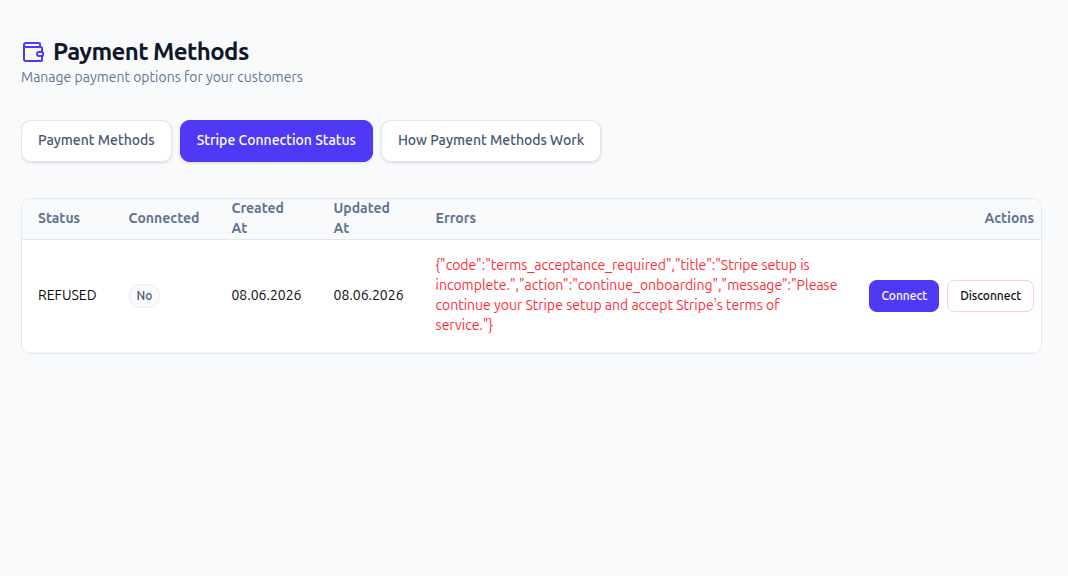
| REFUSED | The Stripe connection attempt was not completed successfully. | Review the Errors column and resolve the listed requirements in Stripe. Contact support@sply24.com if you still need help. |
A PENDING status does not always indicate an error. Stripe can need additional time to process the connection. If the Stripe onboarding flow returned you to Sply24 successfully, wait about one minute, refresh the page, and check again.
If you have completed all required Stripe steps but the connection status remains PENDING, click Disconnect, and then click Connect again and repeat the connection process. If the status is still not updated after another attempt, contact Sply24 support at support@sply24.com for assistance.
Disconnecting removes Stripe payment methods
Disconnecting Stripe automatically removes any Stripe ACH, Stripe SEPA, and Stripe Card payment methods previously configured in Sply24.
Add an Online Payment Method
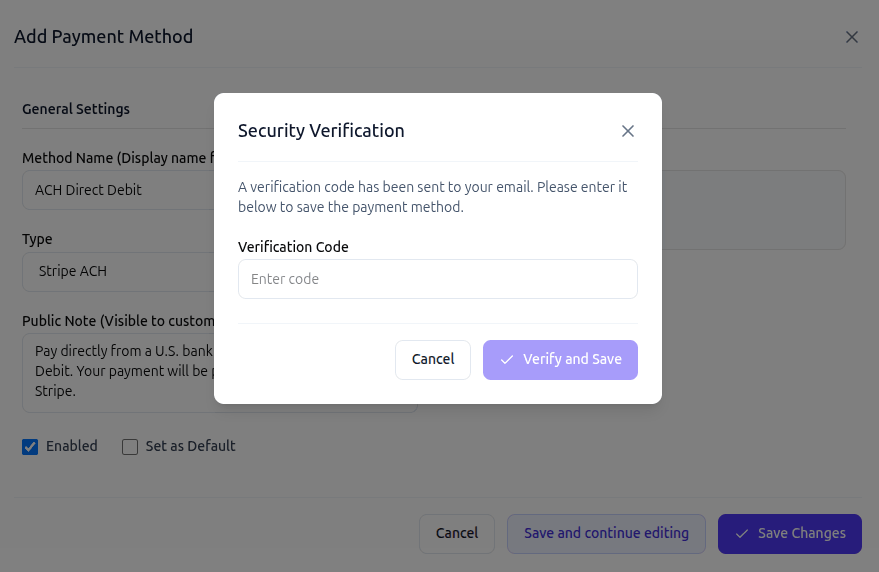
After the Stripe connection status becomes CONNECTED, open thePayment Methods tab and click Add Method. Select Stripe ACH, Stripe SEPA, or Stripe Card, then enter a method name and a short description that buyers will understand at checkout.
Sply24 can request an email verification code before saving the method. Enter the code sent to your email address to complete the setup.
Currency Requirements for Stripe ACH, SEPA, and Card
Stripe ACH
The company currency must be USD. ACH Direct Debit payments in this flow are created for U.S. dollar orders.
Stripe SEPA
The company currency must be EUR. Stripe Checkout requires SEPA Direct Debit line items to be expressed in euros.
Stripe Card
Card payments can use the company currency when that currency is supported by Stripe and the seller's Stripe account.
Stripe Limits in Sply24
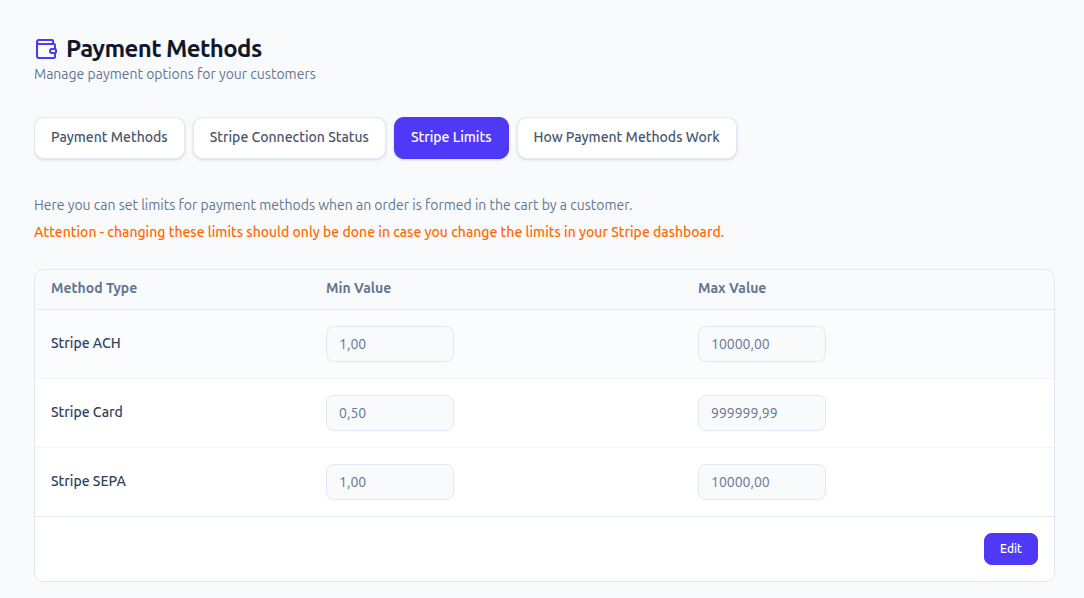
After Stripe Connect is active, the Stripe Limits tab becomes available. Sply24 creates default minimum and maximum values for each online payment method. You can edit them to match the payment limits used in your Stripe account.
| Method | Currency | Minimum | Maximum | Notes |
|---|---|---|---|---|
| Stripe ACH | USD | $1.00 | $10,000.00 | Default Sply24 warning limits for ACH payments from U.S. bank accounts. |
| Stripe SEPA | EUR | €1.00 | €10,000.00 | Stripe also documents a €10,000 per-transaction SEPA Direct Debit limit for standard accounts. |
| Stripe Card | Any | 0.50 | 999,999.99 | Any currency supported by Stripe Card payments. |
Sply24 limits are buyer warnings
Sply24 checks the order amount and displays a warning when it is below or above the limits configured in the platform. These values do not override Stripe. Stripe applies its own account, payment-method, currency, country, risk, and network limits when processing the payment.
Summary
Stripe Connect gives wholesale sellers a practical way to add online B2B payment methods to a private ordering portal. After the seller completes Stripe onboarding and the account is ready to accept charges, Sply24 can offer Stripe ACH payments for USD orders, Stripe SEPA Direct Debit for EUR orders, and Stripe Card for supported currencies.
The seller manages the Stripe account and Stripe processing relationship. Sply24 provides the ordering workflow, payment-method configuration, connection status, and buyer-facing limit warnings without adding a Sply24 transaction commission.
Accept online payments for wholesale orders
Connect your Stripe account to Sply24 and configure card, ACH Direct Debit, and SEPA Direct Debit payment options for your B2B buyers.