B2B Pricing Strategies in Practice: How to Set Up Variable Pricing Rules in Sply24
In wholesale sales, the price is rarely the same for every buyer. One customer may place small orders from time to time. Another may buy regularly and spend thousands of dollars every year. A third customer may purchase the same product in boxes, pallets, or large bulk quantities.
When these prices are managed manually through Excel, email, phone calls, and individual agreements, mistakes appear quickly. A manager may forget to apply a discount. A buyer may not understand why the price has changed. A business owner may lose control over margins.
Sply24 solves this problem with variable pricing and pricing rules. A business owner can define the conditions under which a buyer receives a special price, and the system automatically applies the correct rule during checkout.
This is especially useful for B2B companies that sell wholesale products, where order volume, purchase history, customer-specific pricing, and repeat orders are important parts of daily sales operations.
What Is Variable Pricing in Sply24?
Variable pricing is a system that allows a wholesale business to automatically change product prices based on predefined conditions.
For example, a business owner can create rules such as:
- 10% discount when a customer buys 50 or more units
- 15% discount when the order value is over $1,000
- 20% discount when a customer has purchased more than $10,000 during the calendar year
- A personal price for a specific buyer or company
- A base price for products that should not receive any discount
The main idea is simple: the company sets the pricing rules once, and Sply24 automatically applies the correct price in the catalog, cart, and order. This makes variable pricing an important part of modern B2B pricing strategies, especially for wholesale businesses that want to reduce manual work and give buyers clear pricing conditions.
Common B2B Pricing Strategies for Wholesale Companies
Wholesale companies rarely use one fixed price for every buyer. A B2B pricing strategy usually combines several pricing rules: customer-specific prices, volume discounts, order value discounts, loyalty-based pricing, and product-level margin protection.
In Sply24, these strategies can be configured as pricing rules, so the right price is shown automatically in the catalog, shopping cart, and order.
| Strategy | What it means | Example | How Sply24 supports it |
|---|---|---|---|
| Customer-specific pricing | Different buyers can receive different prices based on agreements, customer type, or account history. | A regular distributor receives a special price for selected products. | Personal product prices can be configured inside pricing rules. |
| Volume pricing | The buyer receives a better price when ordering a larger quantity of a product. | 10% discount when buying 50 or more units. | The Min. Units condition can automatically trigger a bulk buying discount. |
| Order value discount | The discount depends on the total value of the current order. | 15% discount when the order value is over $1,000. | The Order Value condition helps motivate buyers to place larger orders. |
| Loyalty-based pricing | Repeat buyers or high-value customers receive better pricing conditions. | Gold Partner pricing after $10,000 in annual purchases. | The Annual Spend condition supports partner pricing levels and loyalty rules. |
| Product-level margin protection | Some products should not receive discounts because of low margin, limited stock, or special conditions. | A new or low-margin product stays at the base price. | Pricing rules can be applied only to selected products or removed from specific products. |
| Automated discounts | Discounts are calculated automatically instead of being confirmed manually by a sales manager. | The buyer sees the correct discounted price in the cart. | Sply24 checks pricing rule conditions and applies the correct price during checkout. |
Why Variable Pricing Matters for Wholesale Businesses
For a wholesale company, variable pricing helps create a more structured sales strategy and increase buyer loyalty. Instead of checking every customer manually and deciding which price should be applied, the business can configure pricing rules inside Sply24. After that, the system checks the conditions automatically and shows the buyer the correct price.
This helps a business:
For the buyer, the process also becomes easier. The buyer can immediately see which price is applied, why it is applied, and what conditions are required to receive a better price. This is where automated discounts become valuable: the system applies discounts based on clear rules instead of relying on manual communication between the buyer and the sales team.
How a Business Owner Can Set Up a Pricing Rule in Sply24
To create variable pricing, the business owner or company manager logs in to the company account on Sply24 and opens the Pricing Rules section. After clicking the button to create a new rule, a form opens. In this form, the company can define the rule name, description, conditions, discount size, and priority level.

1. Name — Pricing Rule Name
The Name field is used to name the pricing rule. This name will be displayed in the product table, so it is better to keep it short and clear. A pricing rule name should be easy to understand because it will be used inside the interface and should be readable in the product table.
Examples:
2. Description — Pricing Rule Description
The Description field explains how the pricing rule works. This description will be shown on the pricing rules page and in the cart. A clear description reduces questions from buyers and makes the discount system more transparent.
For example:
"Get a better wholesale price when ordering 50 or more units of selected products."Or: "Preferred Partner pricing applies after $20,000 in completed annual purchases."
A good description helps buyers understand which conditions they need to meet before placing a bulk order online.
Which Conditions Can Be Used in Pricing Rules?
A pricing rule in Sply24 can work based on several conditions. It is not necessary to fill in every field. To make the rule work, at least one main condition should be defined.
| Condition / Field | Description | Usage |
|---|---|---|
| Annual Spend | Annual spend is the total amount a buyer has already purchased from your company during the calendar year. Sply24 checks the total value of successfully completed orders for that buyer. | This option works well for loyalty programs, partner pricing levels, and repeat customers. |
| Order Value | Order value is the total value of all products in one order. | This condition helps motivate buyers to increase the size of their order. |
| Min. Units | Min. units is the minimum number of units of one product that the buyer must add to the cart to receive a special price. | This is especially useful for wholesale catalogs where products are often purchased in boxes, packs, cases, pallets, or large batches. |
| Discount | Discount is the percentage discount applied to the base product price. Important: the discount applies only to products that are connected to the corresponding pricing rule. | For example, if the base product price is $100 and the pricing rule gives a 10% discount, the buyer will see a price of $90. |
| Level | The Level field defines which rule has priority if the buyer meets the conditions of several rules at the same time. The higher the Level, the higher the priority of the rule. If the buyer matches both rules, Sply24 applies the rule with the higher level. | This makes pricing rules easier to control when a business uses several B2B pricing strategies at the same time. |
How to Apply a Pricing Rule to Products

Apply the Rule to All Products
In Sply24, a company can apply pricing rules to products in several ways.
When creating or editing a pricing rule, the company can use the Apply to product option. If this option is enabled, the rule will be applied to all products in the company account. This option is useful when a discount should work across the entire catalog.
Apply the Rule Only to Selected Products
The business owner or manager can also open the product table, select specific products, and apply a pricing rule only to those products. For example, products can be filtered by category or tags, and then the pricing rule can be applied only to that selected group.
This is useful when the discount should work only for a specific group of products. If the rule should not apply to a particular product, it can be removed from that product. In this case, the product will be sold at the base price.
This gives the business more control than many public bulk ordering websites, where pricing logic may be less flexible or less private.
How to Remove a Pricing Rule from a Product
If a pricing rule should no longer apply to a specific product, the business owner or manager can remove it from that product.
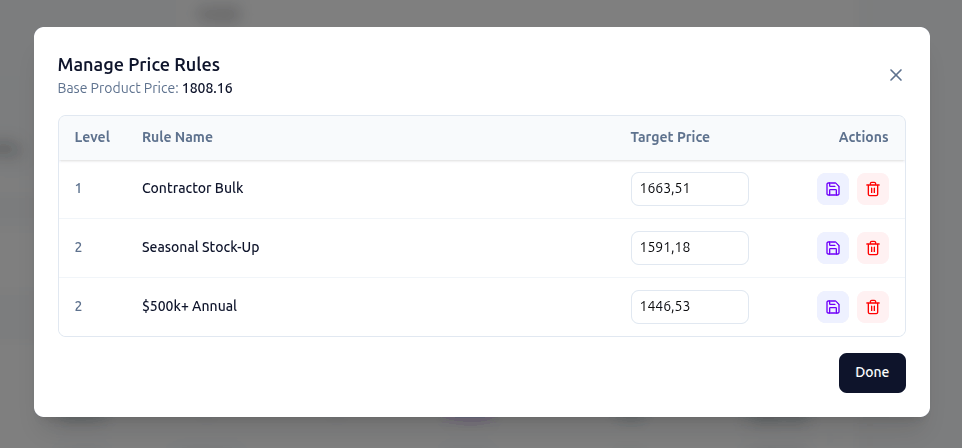
To do this, open the product details page, scroll down to the Price Rules section, and click Manage Price Rules. This will open the editing form where you can remove the assigned pricing rule from the product.
After the pricing rule is removed, Sply24 will no longer apply that discount to this product. The product will be sold at its base price unless another pricing rule is applied to it.
This is useful when a company wants to protect margins on new, limited, seasonal, low-stock, or low-margin products. For example, even if a buyer qualifies for automated discounts or has a default pricing rule assigned to their profile, the discount will not work for a product if that pricing rule has been removed from the product.
How a Company Sees Variable Prices in the Product Table
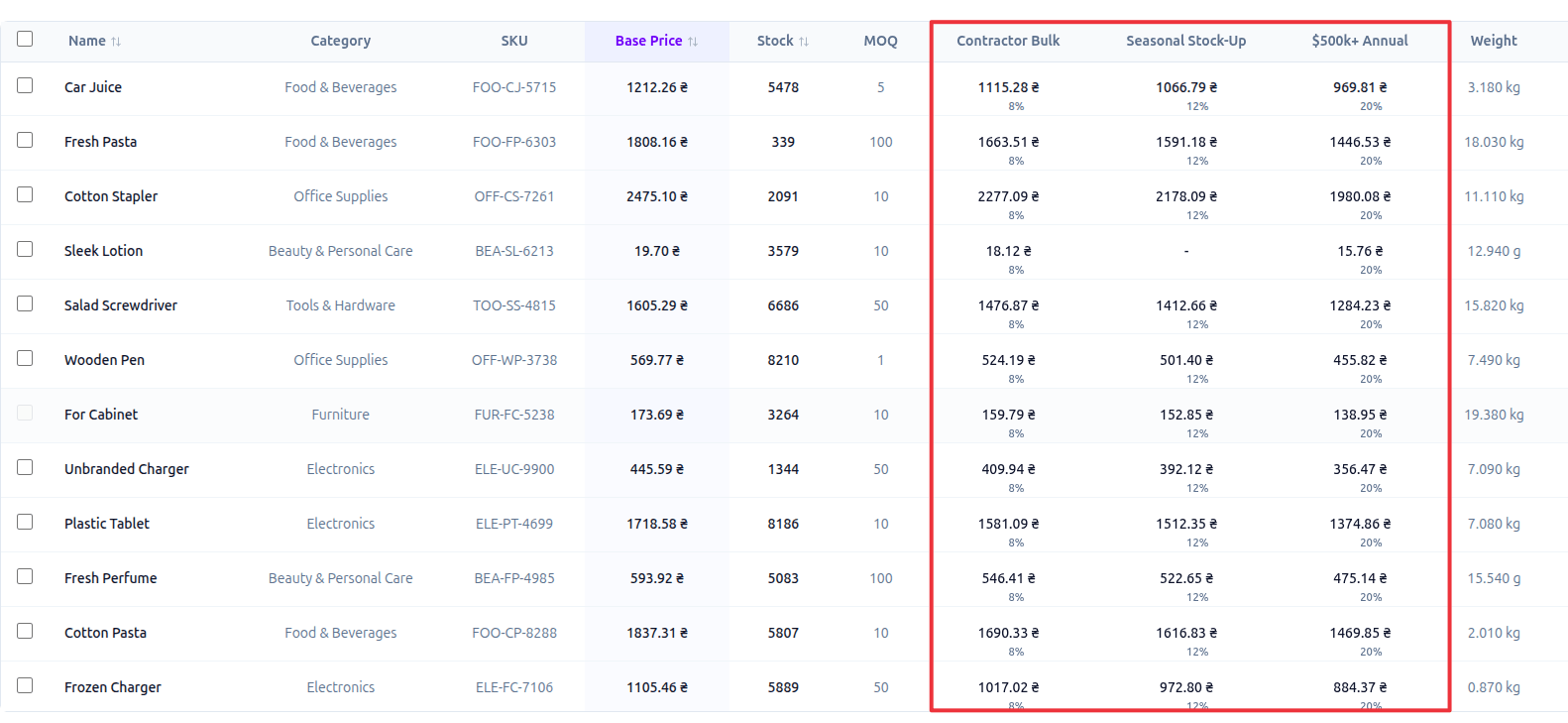
After a pricing rule is applied, a new column with the pricing rule name appears in the product table. In this column, the business owner or manager can see:
- the product price under this rule;
- the discount amount.
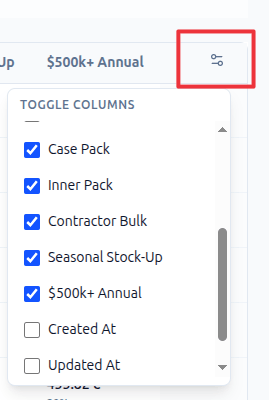
If the column is not visible, it can be enabled in the product table column settings. This allows the company to quickly check which prices apply to different products and buyer groups.
Personal Price for a Specific Product
Sometimes a general discount is not enough. For example, a company may want to give a customer a 10% discount on most products but set a special price for one specific product.
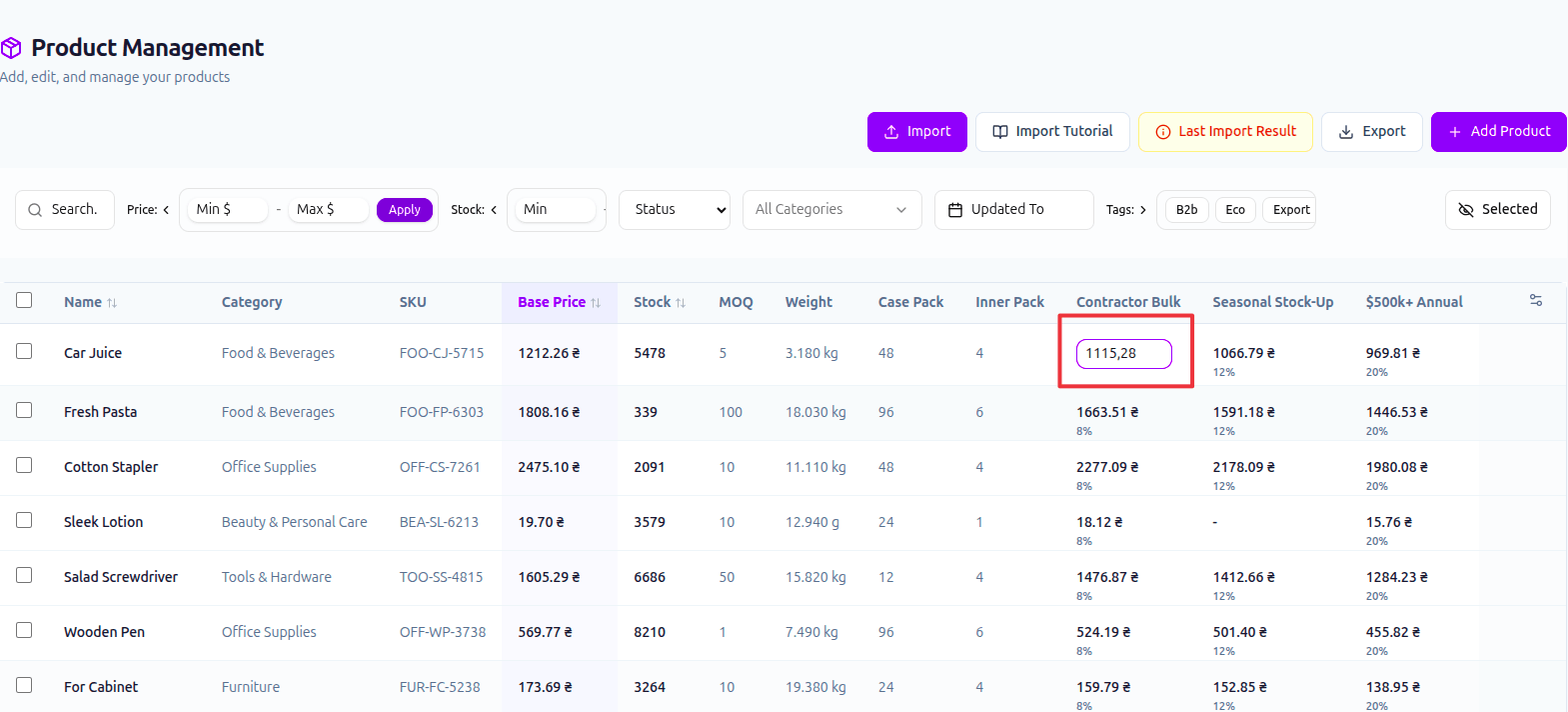
In Sply24, this can be done with a personal product price inside a pricing rule. The manager can open the product table, double-click the price cell under the required pricing rule, and manually enter a different price. After that, this specific product will use the individual price instead of the standard percentage-based discount.
This is useful when:
- the product has a special margin;
- the price was agreed with the customer separately;
- the product is sold under a contract price;
- the discount should be different from the general rule.
How Buyers Use Variable Pricing When Placing an Order
For buyers, the process is simple.
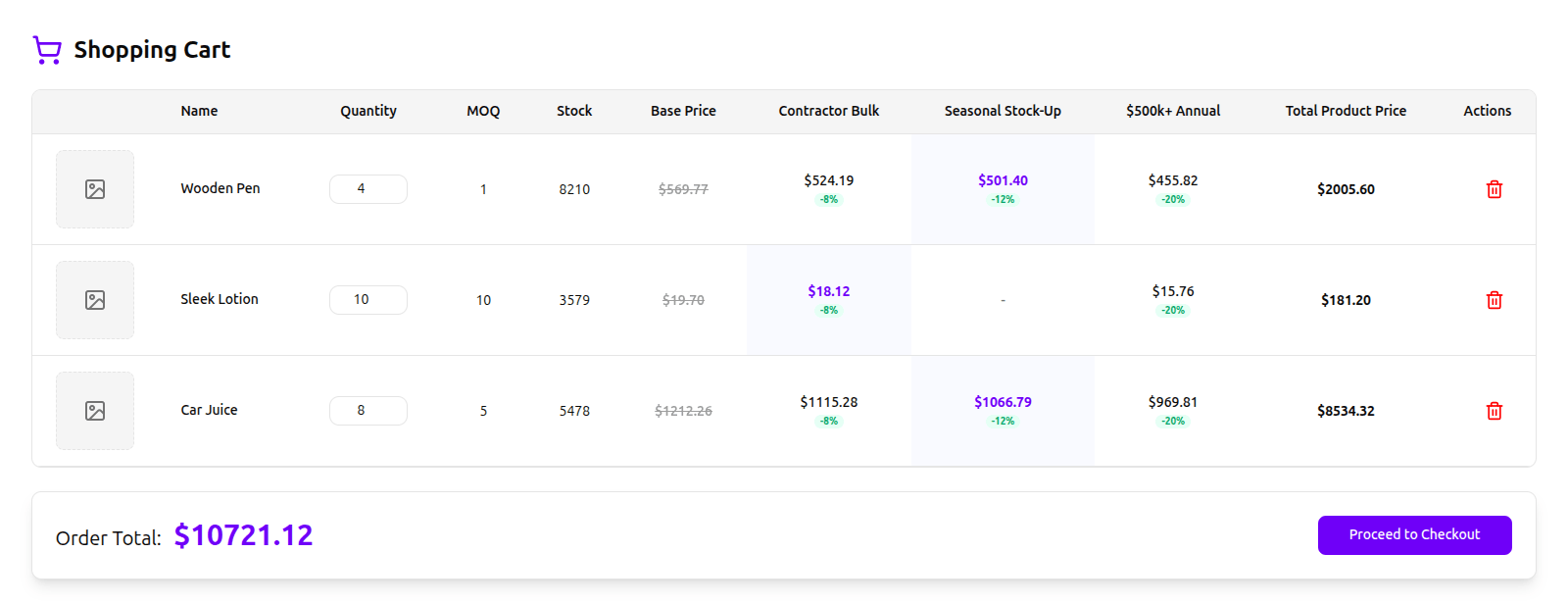
The buyer logs in to the company's private B2B ordering portal, opens the catalog, adds products to the cart, and goes to the shopping cart page. In the cart, the buyer sees the prices that apply to the current order. If the buyer meets the conditions of a pricing rule, Sply24 automatically shows the special price.
The buyer does not need to email a manager, wait for confirmation, or calculate the discount manually. The system checks:
- how many units of the product were added to the cart;
- the value of the current order;
- the buyer's annual purchase volume;
- whether the buyer has a default pricing rule;
- whether the pricing rule is applied to the selected product.
If the conditions are met, the buyer sees the discounted price. If the conditions are not met, the product remains at the base price. This makes it easier for buyers to place a bulk order online without extra communication or manual price confirmation.
Default Pricing Rule for a Buyer
A company can assign a default pricing rule to a buyer.
To do this, the business owner or manager opens the users section, selects the required buyer, clicks edit, and chooses the pricing rule in the buyer's profile. After saving the changes, this rule is automatically connected to the buyer.
This is useful for regular customers, dealers, distributors, or companies that already have agreed pricing conditions. For example, if the buyer is assigned the "Gold Partner" rule, they can receive the corresponding prices for all products to which this rule has been applied.
Example: How Several Pricing Rules Work Together
Imagine that a company has created two pricing rules.
Rule 1: "Wholesale Start"
- Min. units: 50
- Discount: 10%
- Level: 1
This rule gives a 10% discount when the buyer adds 50 or more units of one product to the cart.
Rule 2: "Gold Partner"
- Annual spend: $10,000
- Discount: 20%
- Level: 2
This rule gives a 20% discount when the buyer has purchased more than $10,000 during the calendar year.
Scenario 1: A New Buyer Places a First Large Order
A new customer registers in the system and adds 60 units of a product to the cart. The customer's annual purchase volume is still $0, so the "Gold Partner" rule does not apply. However, the buyer added more than 50 units of one product, so the "Wholesale Start" condition is met. Sply24 automatically applies the 10% discount. The buyer sees the special price and can complete the order without additional approval from a manager.
Scenario 2: A Regular Buyer Reaches $10,000 in Annual Purchases
After several months, the same customer has completed several successful orders. Their annual purchase volume is now over $10,000. During the next order, the customer again adds 60 units of a product to the cart. Technically, the buyer now matches two rules:
- "Wholesale Start", because the buyer is purchasing more than 50 units;
- "Gold Partner", because the buyer's annual spend is over $10,000.
In this case, Sply24 checks the Level field. The "Gold Partner" rule has a higher level, so the system applies this rule. The buyer receives a 20% discount.
Scenario 3: A Product Is Sold Only at the Base Price
Now imagine that the company adds a new product to the catalog. For example, an exclusive item with a base price of $200. The company does not apply any pricing rules to this product because it wants to sell the product only at full price.
Even if the buyer has "Gold Partner" status or a default pricing rule assigned to the profile, the discount will not work. The reason is simple: this product is not connected to the pricing rule. Sply24 will show the base price of $200.
This protects the business from accidental discounts on new, rare, limited, or low-margin products.
Which Companies Benefit Most from Variable Pricing?
Variable pricing is especially useful for companies that sell wholesale products and work with different buyer types, order volumes, and pricing agreements. In these companies, the price often depends not only on the product itself but also on the customer, purchase volume, order history, and agreed business conditions.
Sply24 helps move this logic into a clear digital system. It is useful for companies that need a private B2B ordering portal instead of managing orders manually through Excel, email, phone calls, and spreadsheets.
For many small and mid-sized wholesale companies, Sply24 can become a more controlled alternative to manual pricing workflows and generic bulk ordering websites.
What the Business Owner Gets
For a business owner, variable pricing in Sply24 is a way to automate complex wholesale pricing without manually processing every order. The business owner gets:
- Unified pricing rules for the whole team
- Fewer mistakes when calculating discounts
- Control over which products receive discounts
- The ability to assign personal conditions to buyers
- Flexible work with large orders
- Transparent pricing for regular customers
Instead of managing every discount manually, the company can build repeatable B2B pricing strategies and let Sply24 apply them automatically.
What the Buyer Gets
For the buyer, variable pricing makes the ordering process easier and more transparent. The buyer gets:
- The correct price directly in the catalog and cart
- Automatic discount application
- Clear conditions for getting a better price
- Less need to contact a manager
- Faster repeat orders
- A transparent process for placing wholesale orders
This is especially important for buyers who regularly use bulk buying and need to place a bulk order online quickly, without waiting for manual price confirmation.
Conclusion
Variable pricing in Sply24 helps wholesale companies manage discounts, personal pricing conditions, and large-volume orders without Excel, manual calculations, or constant email communication.
The company creates pricing rules, applies them to the right products and buyers, and Sply24 automatically calculates the correct price during the ordering process.
- For the business owner, this means control and automation.
- For the buyer, this means clear conditions and a faster ordering process.
- For the wholesale company as a whole, this means less manual work, fewer pricing mistakes, and a more convenient B2B sales system.
Try variable pricing in Sply24
Sply24 helps wholesale businesses turn pricing rules, automated discounts, customer-specific prices, and volume-based offers into a clear digital workflow that supports modern B2B pricing strategies.
You can try variable pricing by registering your company in Sply24 or by exploring how the platform works for private B2B wholesale ordering.