How to Create and Manage Price Rules in the Sply24 Platform
Welcome to Sply24, The Sply24 platform is a modern, closed-loop solution for wholesale B2B orders that allows businesses to flexibly manage their pricing policies.
The key tool for building individualized relationships with wholesale clients is the Price Rules system.
This guide explains how to fully automate the process of applying wholesale discounts using flexible configuration scenarios.
The system allows you to build multi-level discount conditions that trigger automatically without manual intervention from a manager. When adding a new Price Rule, you can configure the following parameters:
Priority Level (Level)
Determines the hierarchy of your rules. The higher the specified number, the higher the priority of the rule when calculating the final cart.
If a customer's cart meets the conditions for multiple rules, the system resolves the conflict using the Priority Level:
- The Rule: The rule with the highest priority number always triggers.
- Example: Rule 1 ($5k order) has Priority Level 10. Rule 2 ($7k order) has Priority Level 5.
- The Result: If a cart reaches $10,000, Rule 1 applies because its priority (10) is higher.
Best Practice: Always assign higher priority numbers to rules requiring higher spending to ensure your customers get the correct logical discount.
Activation Conditions (Conditions)
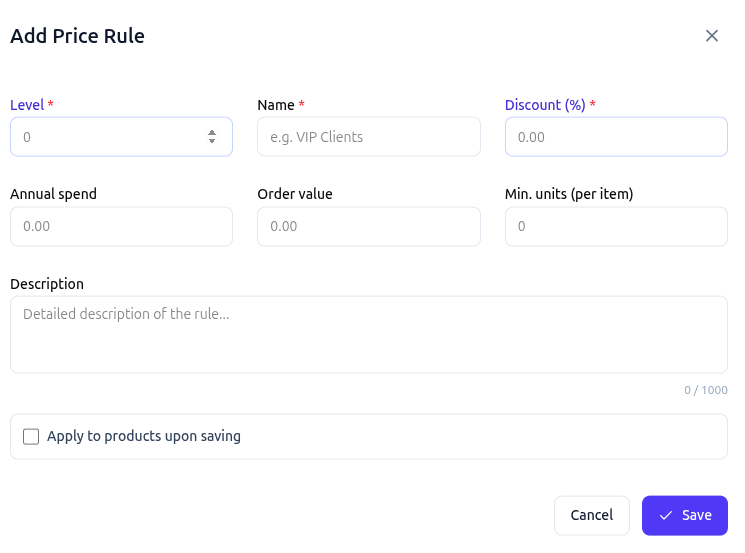
Discounts are applied dynamically, and the calculation occurs for each item in the cart. The discount can be determined based on:
-
Annual spendTriggered when a client reaches a specific volume of annual purchases.
-
Order valueTriggered based on the total sum of the current order.
-
Min. unitsTriggered when a minimum quantity of a specific item is purchased.
Discount Amount (Discount %)
A fixed percentage that is deducted from the base price. For user convenience, a detailed description of each applied rule is displayed directly in the shopping cart.
🎯 Individual and Bulk Application
Thanks to rapid synchronization between the interface and the backend, the platform provides reliable tools for managing large catalogs containing thousands of items.
⚠️ Important Notice on Order Updates
Changing price rules, modifying discount percentages, or unlinking price rules from a product does not affect already placed and finalized orders. However, it does affect items currently added to users' shopping carts. In the event of pricing changes, the user will see a notification alert upon opening their cart.