B2B Ecommerce Payment Methods Without Platform Commission
Sply24 supports a flexible set of B2B ecommerce payment methods for private wholesale ordering. Sellers can offer offline payment options commonly used in B2B trade:
- SEPA transfers for European buyers
- ACH transfers for U.S.
- SWIFT transfers
- Cash payments
For sellers who want to accept online payments, Sply24 also supports Stripe integrations:
- Card payments by credit or debit card
- Stripe ACH payments from U.S. bank accounts
- Stripe SEPA payments from European bank accounts
In this article, we focus only on offline payment methods for B2B wholesale orders in Sply24. You will learn how seller-managed bank transfers and cash payments work, how payment details are shown to buyers, how due days are used, and how sellers review payment proof before marking an order as paid.
For online payment methods and Stripe connect go to this pageB2B Payment Methods with Stripe Connect.
Sply24 does not charge a platform commission on order payments, does not collect buyer payments into a Sply24 account, and does not act as a payment processor for offline payment methods. The payment arrangement remains directly between the seller and the buyer.
Sply24 acts as a technical ordering platform that displays seller-provided payment instructions and helps organize the order workflow. For offline payments, the platform does not verify bank transfers automatically, does not hold funds, does not transfer funds to third parties, and does not make payment decisions on behalf of the seller.
What Are B2B Ecommerce Payment Methods in Sply24?
In Sply24, payment methods are configured by the business owner inside the company account. The seller can enable offline payment methods for buyers and decide which method should be selected by default at checkout.
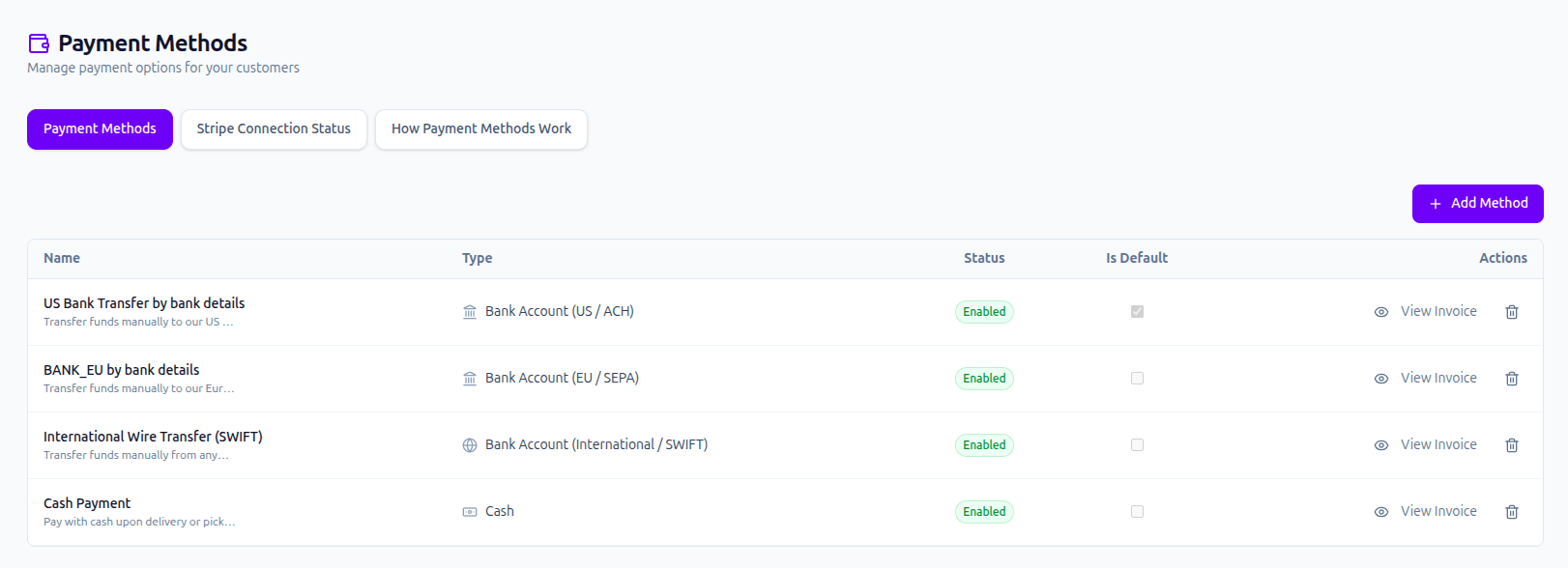
A B2B Platform Without Payment Commission
Many B2B marketplace payments are built around the platform controlling the transaction, charging a fee, or taking a commission from the payment. Sply24 is designed differently for private B2B wholesale ordering.
No platform commission
Sply24 does not add a commission to offline order payments between the buyer and the seller.
Seller-managed payments
The seller provides payment instructions and remains responsible for checking whether the payment was received.
Buyer payment proof
The buyer can upload a payment document, and the seller can review it before marking the order as paid.
Offline Payment Methods Supported in Sply24
Sply24 supports several offline payment methods for wholesale orders. These methods are useful when a seller wants to accept orders online but receive payment directly from the buyer outside the platform.
| Payment method | Common region | Bank details | Use case |
|---|---|---|---|
| SEPA bank transfer | European Union and SEPA-supported markets | Legal Entity Name, Bank Name, IBAN | Useful for wholesale buyers who pay by SEPA bank transfer after placing an order. |
| ACH transfer | United States | Legal Entity Name, Bank Name, Account Number, Routing Number | Useful for US wholesale customers who pay directly to the seller's bank account. |
| SWIFT wire transfer | International bank transfers | Legal Entity Name, Bank Name, Account Number, BIC / SWIFT | Useful for cross-border B2B orders where the buyer pays through an international bank transfer. |
| Cash payment | Local or direct business transactions | No bank details are required in the payment method form. | Useful when a seller accepts cash payments outside the platform workflow. |
If the seller selects Cash as the payment type, bank detail fields are hidden because the seller does not need to provide IBAN, account number, routing number, or similar bank information for this method.
How Sellers Set Up Offline Payment Methods
The business owner registers a company on Sply24 and receives access to the seller dashboard. Inside the dashboard, the seller opens the Payment Methods section and creates at least one payment method.
A company must have at least one configured payment method before buyers can place orders. This ensures that every order has a clear payment option before the buyer reaches checkout.
| Field | What it controls |
|---|---|
| Method Name | The name of the payment method shown to the buyer on the checkout page. |
| Type | The payment type selected by the seller, for example SEPA, ACH, SWIFT, or Cash. |
| Due Days | The maximum number of days given to the buyer to complete the payment before the stock reservation is cancelled and the order becomes overdue. |
| Public Note | A public description shown to the buyer on the checkout page. The seller can use it for payment instructions or internal business terms. |
| Bank details | The seller's bank information shown to the buyer after checkout. These fields depend on the selected offline payment type. |
| Enabled | Controls whether this payment method is visible to buyers during checkout. It is enabled by default. |
| Set as Default | Controls the default checkout selection if the buyer does not have a personal default payment method assigned. |
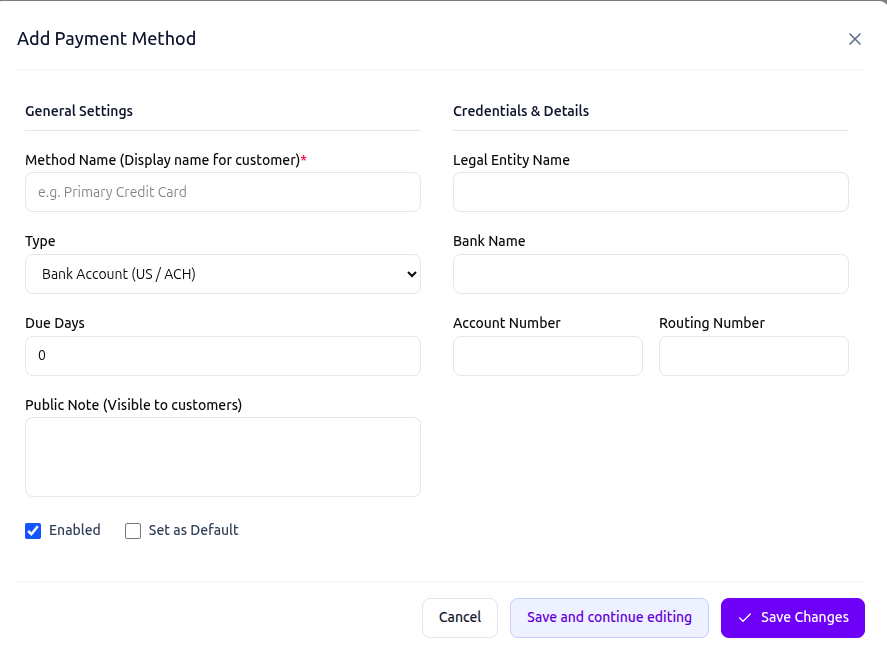
Bank Details for SEPA, ACH, and SWIFT Payments
The bank details required in Sply24 depend on the selected offline payment type. These details are entered by the seller and shown to the buyer after the order is created, so the buyer can make a direct payment to the seller.
SEPA bank transfer
Used for bank transfers in Europe.
| Field | Requirement |
|---|---|
| Legal Entity Name | The official business or account holder name that should receive the payment. |
| Bank Name | The name of the seller's bank. |
| IBAN | International bank account number. IBANs can contain letters and numbers and may be up to 34 characters long. |
ACH bank transfer / SWIFT international transfers
ACH is used for domestic bank transfers in the United States. SWIFT is used for international wire transfers.
| Field | Requirement |
|---|---|
| Legal Entity Name | The official business or account holder name that should receive the payment. |
| Bank Name | The name of the seller's bank. |
| Account Number | The seller's bank account number. It usually contains digits only, but the exact length depends on the bank. |
| Routing Number | For ACH, this is usually a 9-digit U.S. routing number. |
| BIC / SWIFT | Required for SWIFT wire transfers. A BIC/SWIFT code is usually 8 or 11 characters. |
Payment Due Days and Stock Reservation
The Due Days field defines how much time the buyer has to complete the payment. For example, if the seller sets Due Days to 5, the buyer has five days to complete the offline payment and provide payment confirmation if required.
During this period, the order stays in Awaiting Payment status. If the buyer does not pay within the allowed period, the reserved product quantity can be released and the order can move to a "PAYMENT FAILED" status.
Why Due Days matter in wholesale
Wholesale orders can reserve important stock quantities. A clear payment deadline helps the seller avoid holding inventory for buyers who do not complete payment.
How the Buyer Pays an Offline B2B Order
The buyer places an order through the company's private B2B ordering portal and selects one of the available offline payment methods at checkout. After the order is successfully created, the buyer is redirected to the order details page.
On the order details page, the Payment Details block shows the selected payment method, the seller's public note, and the bank details required to complete the payment.
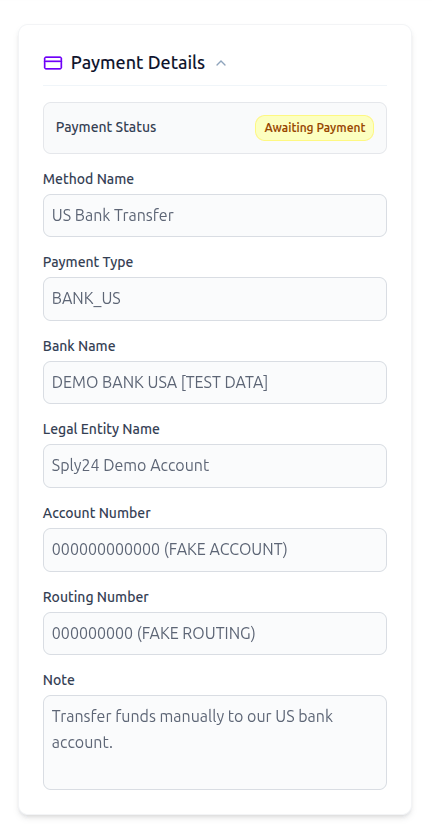
Payment Proof Upload and Seller Approval
After completing the payment outside Sply24, the buyer can open the order page and click the Paid button. The buyer can attach a payment document, such as a bank transfer confirmation, receipt, or other payment proof.
When the payment document is uploaded, Sply24 automatically moves the order to Payment Processing status. The seller receives an email notification and can review the attached document inside the order details page.
If the seller confirms that the payment document is valid, the seller can approve the payment document. After that, the seller can move the order to Paid status according to the company's internal payment confirmation process.
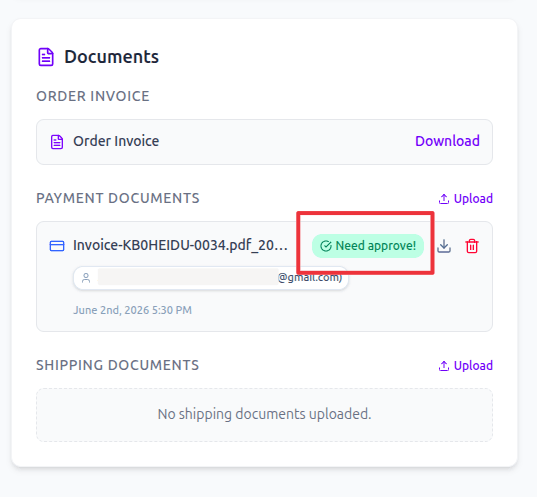
Offline B2B Payment Workflow in Sply24
The offline payment workflow gives both sides a clear structure: the buyer knows how to pay, and the seller has a place to review payment proof before changing the order status.
The seller configures at least one payment method
A company must configure at least one payment method before it can accept orders through its private B2B ordering portal.
The buyer selects a payment method at checkout
During checkout, the buyer chooses one of the enabled payment methods, such as SEPA, ACH, SWIFT, or Cash.
The buyer sees payment details on the order page
After the order is created, the buyer is redirected to the order details page. The Payment Details block shows the payment instructions and bank details provided by the seller.
The order waits for payment
The order remains in Awaiting Payment status while the buyer completes the payment outside Sply24.
The buyer marks the order as paid
After payment, the buyer can click Paid and attach a payment document, such as a receipt or transfer confirmation.
The seller reviews and approves the payment document
The seller receives an email notification, opens the order, checks the uploaded document, and approves the payment invoice if the document is valid.
What the Seller Gets
- Control over available payment methods
- Direct buyer-to-seller payment instructions
- Payment due days for offline orders
- Payment proof upload from buyers
- Email notification when payment proof is submitted
- Seller approval before the order is marked as paid
What the Buyer Gets
- Clear payment method selection at checkout
- Bank details visible after the order is created
- Public payment notes from the seller
- A clear payment deadline
- A simple way to upload payment proof
- Transparent order status after payment submission
Conclusion
Sply24 gives wholesale businesses a way to move order placement online while keeping payment control between the buyer and the seller. The platform displays seller-provided payment instructions, helps buyers submit payment proof, and gives sellers a structured workflow for reviewing offline payments.
For businesses that need a B2B platform without payment commission on offline payments, Sply24 can be a practical option for private wholesale ordering, seller-managed payments, and direct buyer-to-seller payment workflows.
Set up seller-managed B2B payments in Sply24
Sply24 helps wholesale businesses create a private B2B ordering portal with flexible payment methods, direct bank transfer instructions, payment due days, buyer payment proof, and seller approval workflows.